
- Release Year: 2001
- Platforms: Windows
- Publisher: Sierra On-Line, Inc.
- Genre: Compilation
- Game Mode: Single-player
- Average Score: 92/100
Description
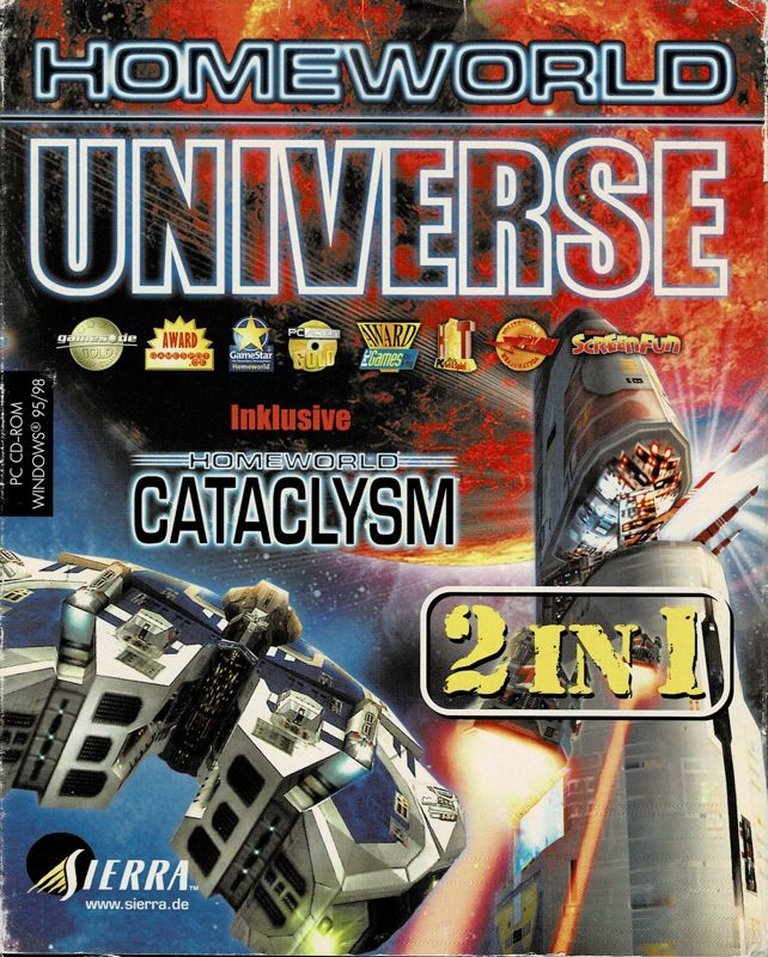
Homeworld Universe is a compilation of real-time strategy games set in a vast, three-dimensional space environment. The series follows the Kushan exiles from the planet Kharak as they journey across the galaxy to reclaim their ancient homeworld of Hiigara after their planet is destroyed. Players gather resources, build fleets, and engage in tactical battles against various factions, including pirates, mercenaries, and the oppressive Taiidan Empire. The game is renowned for its immersive storytelling and innovative gameplay mechanics.
Homeworld Universe Guides & Walkthroughs
Homeworld Universe Reviews & Reception
metacritic.com (93/100): Engrossing RTS play matched to a vital and visually intense story make this a gaming experience like no other.
gamespot.com (90/100): Homeworld is both an excellent game and one that may well reshape the entire real-time strategy genre.
ign.com (95/100): Welcome to the best game of the year.
Homeworld Universe Cheats & Codes
Homeworld (PC)
Add these to the shortcut parameters for Homeworld. If you’re having problems getting them working, try replacing the slash with a dash (-).
| Code | Effect |
|---|---|
| /debug | Enable debug mode |
| /nodebugInt | Disable int 3 after fatal error |
| /noBG | Disable galaxy backgrounds |
| /noCompPlayer | Disable default CPU players |
| /notactics | Disable tactics |
| /noretreat | Disables retreat tactics |
| /disableAVI | Disable FMV sequences |
| /heap | Sets global memory heap size |
| /prepath | Sets path to search for opening files |
| /CDpath | Sets path to CD-ROM |
| /freemouse | Press [F11] to toggle free mouse |
| /ignoreBigfiles | Do not use anything from bigfile(s) |
| /logFileLoads | Create log of data files loaded |
| /disableKatmai | Do not use KNI even if support is detected |
| /forceKatmai | Force usage of KNI even if determined to be unavailable |
| /noSound | Turn all sound effects off |
| /noSpeech | Turn all speech off |
| /reverseStereo | Swap the left and right audio channels |
| /waveout | Force mixer to write to Waveout |
| /dsound | Force mixer to write to DirectSound driver |
| /noFilter | Disable bi-linear filtering of textures |
| /noSmooth | Do not use polygon smoothing |
| /nilTexture | Do not load textures |
| /NoFETextures | Turn off front end textures |
| /stipple | Enable stipple alpha (software renderer) |
| /noShowDamage | Disable ship damage effects |
| /sw | Reset rendering system to defaults at startup |
| /fullscreen | Display fullscreen with software renderer (default) |
| /window | Display in a window |
| /noBorder | No border on window |
| /640 | 640×480 resolution (default) |
| /800 | 800×600 resolution |
| /1024 | 1024×768 resolution |
| /1280 | 1280×1024 resolution |
| /1600 | 1600×1200 resolution |
| /d16 | 16 bit color |
| /d24 | 24 bit color |
| /d32 | 32 bit color |
| /truecolor | Try 24 bit modes before 15/16 bit |
| /slowBlits | Use slow screen blits |
| /device | Select an rGL device by name (sw, fx, d3d) |
| /gl | Select default OpenGL as renderer |
| /d3d | Select Direct3D as renderer |
| /nohint | Disable usage of OpenGL perspective correction hints |
| /noPause | No pausing with [Alt] + [Tab] |
| /noMinimize | No minimize with [Alt] + [Tab] |
| /dockLines | Show dock lines |
| /gunLines | Show gun lines |
| /lightLines | Show light lines in debug mode |
| /boxes | Render bounding bowties on the ships |
| /textFeedback | Enable text feedback in game commands |
| /aiplayerLog | Enable AI Player logging |
| /determCompPlayer | CPU players are deterministic |
| /gatherStats | Enable gathering of stats |
| /captaincyLogOff | Turn off captaincy log file |
| /captaincyLogOn | Turn on captaincy log file |
| /logOff | Turn off network logging file |
| /logOn | Turn on network logging file |
| /logOnVerbose | Turn on verbose network logging file |
| /statLogOn | Generate game stats log file |
| /intOnSync | Generate Int 3 when a sync error occurs |
| /debugSync | Autosaves game frequently, records packets |
| /forceLAN | Allow LAN play regardless of version |
| /testNIS | Enables NIS testing mode using [nisFile] |
| /testNISScript | Enables NIS testing mode using [scriptFile] |
| /demoRecord | Record a demo |
| /demoPlay | Play a demo |
| /packetRecord | Record packets of multiplayer game |
| /packetPlay | Play back packet recording |
| /disablePacking | Do not use the packed textures if available |
| /smCentreCamera | Center the SM world plane at about 0,0,0 rather than the camera |
| /closeCaptioned | Close captioning |
Homeworld Remastered Collection (PC)
Add these to the shortcut parameters for Homeworld. If you’re having problems getting them working, try replacing the slash with a dash (-).
| Code | Effect |
|---|---|
| /debug | Debug mode |
| /nodebugInt | Disables mode 3 error |
| /noBG | No stars, asteroids, etc. |
| /noCompPlayer | Disables computer players |
| /notactics | Disables tactics |
| /noretreat | Disables retreat tactics |
| /disableAVI | Disables movie sequences |
| /heap | Global memory heap size setter |
| /prepath | Set path for opening files |
| /CDpath | Set path to CD-ROM |
| /freemouse | Use F11 to toggle free mouse movement |
| /ignoreBigfiles | Disables bigfiles |
| /logFileLoads | Logs data files loaded |
| /disableKatmai | Disables KNI |
| /forceKatmai | Use KNI |
| /noSound | Disables sound effects |
| /noSpeech | Disables talking |
| /reverseStereo | Swap speaker output |
| /waveout | Use waveout |
| /dsound | Use direct sound driver |
| /noFilter | Disables bi-linear filtering |
| /noSmooth | Disables polygon smoothing |
| /nilTexture | Disables textures |
| /NoFETextures | Disables front-end textures |
| /stipple | Stipple alpha (renderer) |
| /noShowDamage | No damage effects |
| /sw | Resets rendering systems to default |
| /fullscreen | Full screen mode (default) |
| /window | Display game in window |
| /noBorder | Disables window border |
| /640 | 640×400 resolution |
| /800 | 800×600 resolution |
| /1024 | 1024×768 resolution |
| /1280 | 1280×1024 resolution |
| /1600 | 1600×1200 resolution |
| /d16 | 16-bit color |
| /d24 | 24-bit color |
| /d32 | 32-bit color (more precise 24-bit) |
| /truecolor | Use 24-bit color |
| /slowBlits | Enables slow screen bits |
| /device | Use rGL device |
| /gl | Use OpenGL |
| /d3d | Use Direct3D |
| /nohint | Disables perspective hints |
| /noPause | Disables pausing using Alt + Tab |
| /noMinimize | Disables minimize using Alt + Tab |
| /dockLines | Enables dock lines |
| /gunLines | Enables gun lines |
| /lightLines | Light lines in debug mode |
| /boxes | Make bowties on ships |
| /textFeedback | Text feedback in game commands |
| /aiplayerLog | Logs AI |
| /determCompPlayer | Harder computer opponents |
| /gatherStats | Gathers stats |
| /captaincyLogOff | Disables captaincy log files |
| /captaincyLogOn | Enables captaincy log files |
| /logOff | Disables network logging files |
| /logOn | Enables network logging files |
| /logOnVerbose | Enables verbose logging files |
| /statLogOn | Generates stats log file |
| /intOnSync | Make an int 3 when a sync error occurs |
| /debugSync | Records packets and saves frequently |
| /forceLAN | Allow LAN play with any version |
| /testNIS | NIS testing using nisFile |
| /testNISScript | NIS testing using scriptFile |
| /demoRecord | Record a demo |
| /demoPlay | Play a demo |
| /packetRecord | Record packets during multiplayer games |
| /packetPlay | Play back packet recording |
| /disablePacking | Disables packed textures |
| /smCentreCamera | Camera starts at (0,0,0) instead of the Mothership |
| /closeCaptioned | Add subtitles |
Homeworld Universe: A Definitive Review of the Groundbreaking Space Opera
Introduction
In the pantheon of real-time strategy (RTS) games, few titles command the reverence bestowed upon Homeworld. Released in 1999 by Relic Entertainment, Homeworld Universe—a 2001 compilation bundling Homeworld and its expansion Cataclysm—stands as a testament to visionary design, revolutionary technology, and storytelling that transcends the medium. This review dissects the legacy of a game that redefined space strategy, blending operatic narrative tension with innovative 3D mechanics. Thesis: Homeworld Universe is not merely a collection of games but a seminal work that reshaped sci-fi storytelling and RTS gameplay, leaving an indelible mark on the genre.
Development History & Context
Studio Vision: Relic Entertainment, founded in 1997 by Alex Garden and Luke Moloney, sought to create a strategy game that captured the cinematic scale of Star Wars and the existential gravitas of Battlestar Galactica. Their ambition was audacious: to translate the vastness of space into a fully 3D RTS, a concept untested at the time.
Technological Constraints: In an era dominated by 2D RTS titles like Command & Conquer, Homeworld’s use of a 3D engine was groundbreaking. Relic leveraged the OpenGL API to render spherical battlefields, dynamic camera angles, and Newtonian physics for ship movements. However, technical limitations forced compromises, such as the removal of ship customization and faction-specific unit variants.
Gaming Landscape: The late ’90s saw RTS games prioritizing fast-paced skirmishes over narrative depth. Homeworld bucked trends by emphasizing persistent fleets, strategic resource management, and a campaign that wove emotional stakes into its missions. Its release coincided with Sierra’s gamble on niche PC titles, a bet that paid off critically and commercially.
Narrative & Thematic Deep Dive
Plot Overview: Homeworld follows the Kushan, exiles on the desert planet Kharak, who discover a galactic map pointing to their ancestral homeworld, Hiigara. After constructing the Mothership—a vessel carrying 600,000 cryo-preserved colonists—the Kushan trigger a genocidal response from the Taiidan Empire, who enforce a millennia-old treaty forbidding hyperspace technology. The ensuing odyssey spans 16 missions, blending tactical combat with moments of profound loss, as seen in the iconic “Kharak is burning” sequence.
Characters & Dialogue: Karan S’jet, the scientist neurally bonded to the Mothership, serves as a silent protagonist, her humanity juxtaposed against the sterile AI of Fleet Intelligence. Supporting figures like the enigmatic Bentusi traders and the rebel Taiidan captain Elson add moral complexity, while voice acting—delivered with chilling stoicism—elevates the script’s sparse yet impactful dialogue.
Themes:
– Exile & Identity: The Kushan’s journey mirrors biblical exodus narratives, emphasizing cultural rediscovery.
– The Cost of Survival: The destruction of Kharak and the sacrifices of the Bentusi underscore the price of defiance.
– Imperialism & Rebellion: The Taiidan Empire’s collapse under its own corruption critiques centralized power.
Cataclysm (later renamed Emergence) expands these themes, introducing the bio-mechanical “Beast” as a metaphor for assimilation and ethical decay.
Gameplay Mechanics & Systems
Core Loop: Homeworld’s gameplay revolves around resource gathering (via Resource Collectors), fleet construction, and tactical positioning in 3D space. The persistence of ships between missions created emotional investment—losing a heavily upgraded Destroyer in Mission 10 haunted players in Mission 11.
Innovations:
– 3D Movement: Ships could attack from any angle, necessitating formations like “sphere” or “wall.”
– Salvage Mechanics: Capturing enemy vessels (e.g., Kadeshi Multi-Beam Frigates) rewarded cunning over brute force.
– Sensor Manager: A strategic map view allowed players to coordinate fleets across vast distances.
Flaws: The learning curve for 3D controls alienated some players, and late-game missions could overwhelm those who mismanaged their fleets. Cataclysm refined these systems with siege weapons and modular ship upgrades but lacked the original’s narrative polish.
World-Building, Art & Sound
Setting: Homeworld’s universe is a tapestry of ancient prophecies, derelict megastructures, and warring ideologies. The Karos Graveyard—a debris field of colossal ships—hints at a forgotten galactic war, while the Bentusi’s cybernetic union with their vessels explores transhumanist themes.
Visual Design: Art director Rob Cunningham drew inspiration from sci-fi illustrators like Chris Foss and Peter Elson, resulting in ships that felt both utilitarian and mythic. The Kushan Mothership’s vertical design contrasted with the Taiidan’s angular brutalism, while nebulae and supernovae provided painterly backdrops.
Soundtrack: Paul Ruskay’s score blended ambient electronica with classical motifs, most famously Samuel Barber’s Adagio for Strings during Kharak’s destruction. The Bentusi theme’s haunting choral arrangements and Yes’ closing track Homeworld (The Ladder) cemented the game’s emotional resonance.
Reception & Legacy
Critical Reception: Homeworld holds a 93/100 on Metacritic, praised for its visuals, innovation, and narrative. Critics lauded its “ cinematic grandeur” (IGN) and “strategic depth” (GameSpot), though some found the difficulty spikes unforgiving.
Commercial Success: Selling 500,000 copies in six months, Homeworld secured Sierra’s foothold in the PC market. The 2015 Remastered Collection reintroduced the franchise to a new generation, selling 700,000 units on Steam alone.
Influence: Homeworld inspired successors like Distant Worlds and FTL: Faster Than Light. Its DNA is evident in Destiny’s art style and Mass Effect’s galaxy-spanning stakes. The 2024 release of Homeworld 3—funded via Fig—proves its enduring appeal.
Conclusion
Homeworld Universe is a masterpiece of ambition and execution. Its fusion of tactile strategy, existential storytelling, and audiovisual artistry remains unmatched. While later entries like Homeworld 2 and Deserts of Kharak expanded the lore, the original compilation stands as a landmark—a game that dared to ask players not just to conquer, but to feel. In the annals of video game history, Homeworld is less a title than a constellation: a guiding star for sci-fi and strategy alike.
Final Verdict: Homeworld Universe is essential—a triumph of design and narrative that belongs in every gamer’s collection.