
- Release Year: 2003
- Platforms: Macintosh, Windows
- Publisher: Ubi Soft Entertainment Software
- Developer: Ubi Soft Entertainment Software
- Genre: Educational
- Perspective: Fixed / flip-screen
- Game Mode: Single-player
- Gameplay: logic, Math, Mini-games, Pre-school, toddler
- Setting: Educational
- Average Score: 84/100
Description
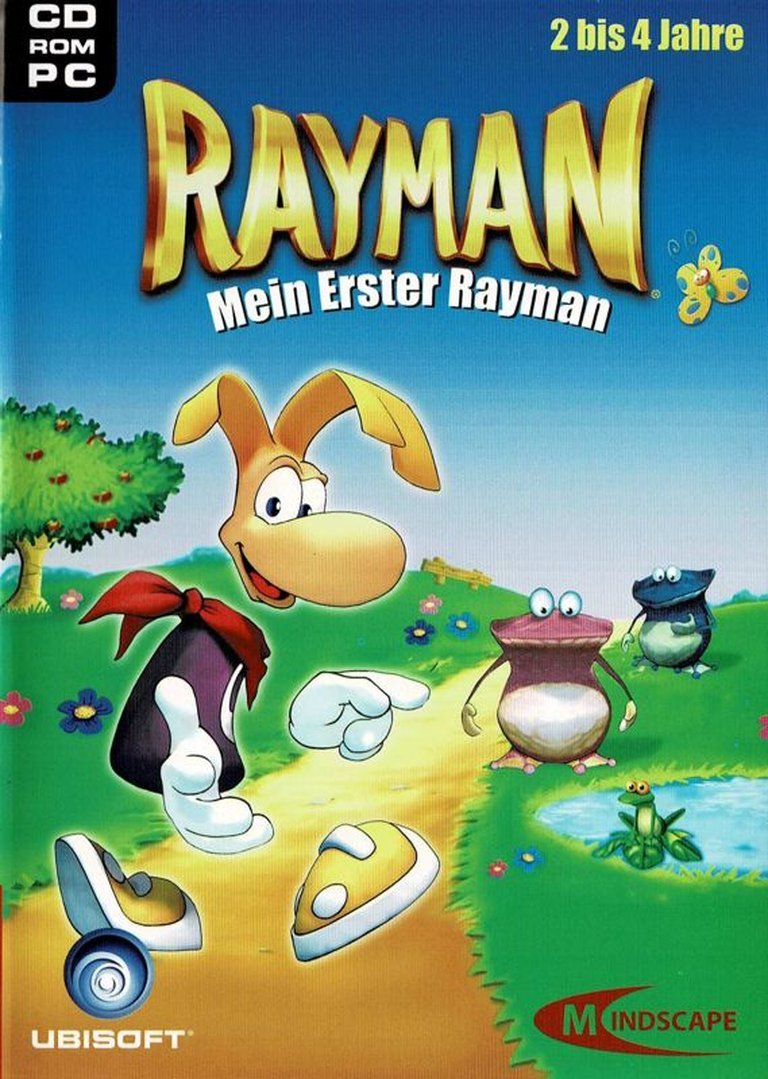
Rayman: My First Rayman is an educational game designed for children aged 2–4 years, featuring a collection of minigames aimed at developing language skills, logical thinking, concentration, and the recognition of colors and shapes. Set in the vibrant and playful world of the Rayman series, the game offers three difficulty levels to cater to young learners, making it an engaging and accessible introduction to early childhood education through interactive gameplay.
Rayman: My First Rayman Reviews & Reception
metacritic.com (84/100): An insanely good time!
Rayman: My First Rayman Cheats & Codes
PC (Original 1995 Version)
While the cheat codes may be entered any time during a level, you may find it easier to press the PAUSE key to freeze the game, type the code, then unpause the game.
| Code | Effect |
|---|---|
| kom0ogdk | Restores 5 energy points |
| 86e40g91 | Get 10 tings |
| 2x2rmfmf | Golden fist |
| trj8p | 99 lives |
| en5gol2g | All powers |
| o8feh | Skip to next level |
| 4ctrepfj | Access to all 6 worlds (map screen only) |
| b76b7081 | After you have found all of the cages and defeated the final bosses, type this code at the map screen to play a hidden breakout game. |
PC (Rayman Gold or Rayman Forever)
While the cheat codes may be entered any time during a level, you may find it easier to press the PAUSE key to freeze the game, type the code, then unpause the game.
| Code | Effect |
|---|---|
| raypoint | Restores 5 energy points |
| raywiz | Get 10 tings |
| goldfist | Golden fist |
| raylives | 99 lives |
| power | All powers |
| winmap | Skip to next level |
| alworld | Access to all 6 worlds (map screen only) |
| cbray | After you have found all of the cages and defeated the final bosses, type this code at the map screen to play a hidden breakout game. |
PC (Additional Codes)
Enter the following codes during game play to activate the corresponding cheat function. Note: Numbers must be entered using the top row of keys.
| Code | Effect |
|---|---|
| goldfist | Golden fist |
| raypoint | Full health |
| raylives | 99 lives |
| raypower | All powers |
| kom0ogdk | 5 lives |
| trj8p | 99 lives |
| 86e40g91 | 10 more Tings |
| b76b7081 | Breakout mini-game |
| 2x2rmfmf | Golden power fist |
| o8feh | Go to next map |
| en5gol2g | All powers |
| 4ctrepfj | Access all six worlds |
PC (In-Level Codes)
Enter during gameplay. [TAB] indicates that you need to press the ‘tab’ key. [BACKSPACE] indicates that you need to press the ‘backspace’ key.
| Code | Effect |
|---|---|
| raylives | 99 lives |
| [TAB]bertrand | 99 lives |
| goldfist | All Fist Power-Ups |
| [TAB]antoine | All Fist Power-Ups |
| power | All Normal Powers |
| [TAB]benoit | All Normal Powers |
| raypoint | Full Energy |
| [TAB]christ | Full Energy |
| raywiz | Get 10 More Tings |
| [TAB]jojo | Get 10 More Tings |
| winmap | Skip Current Sub-Level (does not work while moving or hanging) |
| [TAB]cyril | Skip Current Sub-Level (does not work while moving or hanging) |
| [TAB]program | Toggle Hidden Message Display |
| [TAB];overay[BACKSPACE] | Use Arrow Keys for Free Movement |
PC (In-Map Codes)
Enter codes at the map screen. [TAB] indicates that you need to press the ‘tab’ key. [BACKSPACE] indicates that you need to press the ‘backspace’ key.
| Code | Effect |
|---|---|
| freq10 | 100MHz Refresh Rate |
| freq80 | 80MHz Refresh Rate |
| power | All Normal Powers at the Start of the Level |
| [TAB]benoit | All Normal Powers at the Start of the Level |
| lens | Lens Effect |
| alworld | Open Every Level (Except Last Level) |
| [TAB]francois | Open Every Level (Except Last Level) |
| cbray | Play a Breakout Minigame (Requires Completed Game) |
| [TAB]olivier | Play a Breakout Minigame (Requires Completed Game) |
| [TAB]cbrayal[BACKSPACE] | Play a Random Level in the Breakout Minigame |
| [TAB]alevel[BACKSPACE] | Sub-Level Selection (Enter a Level After Activation) |
PlayStation (NTSC)
Enter the following codes during game play or at the password screen.
| Code | Effect |
|---|---|
| L2 + R1 + L1 + R2 (hold), release L1, L2, R2, R1, press Circle, hold Left + Circle + Square + Triangle, release Left, Triangle, Square, Circle | Full Power Up With 99 Lives |
| L2 + R1 + L1 + R2 (hold), release L1, L2, R2, R1, press Triangle, hold Right + Circle + Square + X, release Right, X, Square, Circle | Full Power Up With 99 Lives (alternate method) |
| L1 + L2 + R1 + R2 (hold after Ubi-Soft logo until brick wall appears, then hold Start, release when screen turns black) | Large Rayman Demo |
| J5VLFP58VB | Band Land completed |
| J5K!ZZC8MD | Blue Mountain completed |
| SM!KV7WSXD | Cave of Skop completed |
| SX2!ZP58MD | Picture City completed |
| SD3BKFOOMN | All cages, all abilities at last level |
| 942KV3W9XD | Last level with 99 lives |
| XNB9FM!Z2? | Ninety-nine Lives |
PlayStation (PAL)
Enter the following codes during game play or at the password screen.
| Code | Effect |
|---|---|
| !GNSZ36N9X | Band Land, Allegro Presto |
| PJNJF!Q29P | Blue Mountain, Twilight Gulch |
| Z?WOZ3QTFP | Blue Mountain, The Hard Rocks |
| Z8N8P36D6P | Picture City, Pencil Pentathalon |
| Z8WOZ5QNOZ | Picture City, Space Mama’s Crater |
| VPN8P!646Z | The Cave of Skops, Crystal Palace |
| P1NO7!6NSZ | The Cave of Skops, Eat at Joe’s |
| FGN83562SZ | The Cave of Skops, Mr Skops’ Stalactities |
| FJSJ!C62OP | Candy Chateau |
| Circle, Circle, Left, Circle, Circle (pause game, hold R2) | Picture In A Picture Window |
PlayStation (General)
Enter the following codes during game play or at the password screen.
| Code | Effect |
|---|---|
| Triangle, Square, Start (hold until screen shakes) | Disable levels |
| L1, L2, R1, R2 (hold after Ubi-Soft logo until brick wall appears, then hold Start, release when screen turns black) | Big Rayman |
| Up, Down, Right, Left (at continue screen with alarm clock) | Ten Continues |
| R1 + R2 + L2 (hold), Circle, Right, Square, Left, Circle (pause game) | Full Power-Ups and 99 Lives |
| L2 (hold), R1 (hold), L1 (hold), R2 (hold), release L1, L2, R2, R1, tap Circle, hold Left, Circle, Square, Triangle, release Left, Triangle, Square, Circle (pause game) | Full Power-Ups and 99 Lives (alternate method) |
| Circle, Circle, Left, Circle, Circle (pause game, hold R2) | Picture in Picture |
Rayman: My First Rayman – A Deep Dive into Ubisoft’s Forgotten Edutainment Experiment
Introduction: The Unlikely Spin-Off in Rayman’s Legacy
In the pantheon of Rayman’s storied history—a franchise celebrated for its whimsical artistry, punishing platforming, and Michel Ancel’s unbridled creativity—Rayman: My First Rayman (2003) stands as an anomaly. Released during a transitional era for Ubisoft and the Rayman brand, this educational title targeted preschoolers aged 2–4, a stark departure from the series’ reputation for challenging, visually dazzling platformers. While Rayman had already ventured into edutainment with titles like Rayman Brain Games and Rayman Junior, My First Rayman represented the most stripped-down, accessible iteration yet—a digital playground designed not to test reflexes or patience, but to nurture foundational cognitive skills.
This review dissects Rayman: My First Rayman through a multifaceted lens: as a historical artifact of Ubisoft’s early-2000s experimentation, as an educational tool, and as a curious footnote in the Rayman saga. By analyzing its development context, gameplay mechanics, and reception (or lack thereof), we aim to answer a fundamental question: Does this game deserve its obscurity, or is it an underappreciated gem in the franchise’s diverse catalog?
Development History & Context: Ubisoft’s Edutainment Gambit
The Studio & Vision: Ubisoft’s Educational Ambitions
By the early 2000s, Ubisoft had firmly established Rayman as its flagship platformer, with Rayman 2: The Great Escape (1999) and Rayman 3: Hoodlum Havoc (2003) cementing the series’ transition into 3D. However, the company also recognized the lucrative potential of the edutainment market—a sector dominated by titles like Reader Rabbit and JumpStart. Ubisoft’s strategy was twofold: leverage Rayman’s burgeoning brand recognition to attract young audiences while diversifying the franchise beyond traditional gaming.
My First Rayman was developed under the Ubisoft eXclusive label, a sub-brand for budget-friendly, family-oriented titles. The game’s creation coincided with the release of Rayman 3, suggesting a deliberate effort to capitalize on the character’s visibility. Unlike the mainline games, which were helmed by Ubisoft Montpellier, My First Rayman was likely outsourced to a smaller team specializing in educational software—a common practice for such spin-offs.
Technological Constraints & Design Philosophy
Targeting toddlers imposed severe technical and design limitations. The game eschewed the fluid animations and sprawling levels of its predecessors in favor of fixed/flip-screen environments and point-and-click interactions. The visuals, while retaining Rayman’s signature vibrant aesthetic, were simplified to avoid overwhelming young players. The CD-ROM format (a relic even in 2003) hinted at the game’s budget constraints, as DVDs were becoming standard for multimedia-heavy titles.
The development team faced a unique challenge: balancing Rayman’s identity with educational imperatives. The result was a modular minigame collection, each activity tailored to specific learning objectives (e.g., color recognition, basic logic). This approach mirrored contemporary edutainment trends but risked diluting the franchise’s core appeal.
The Gaming Landscape in 2003
The early 2000s were a period of rapid evolution in gaming. The PlayStation 2, GameCube, and Xbox dominated consoles, while PC gaming thrived with titles like The Sims and Warcraft III. Educational games, however, remained niche, often relegated to bargain bins or bundled with children’s PCs. My First Rayman entered this crowded space alongside competitors like Disney’s Activity Center and Fisher-Price’s Ready for School series.
Ubisoft’s timing was strategic: Rayman 3 had just launched, and the Raving Rabbids phenomenon was still years away. By targeting preschoolers, Ubisoft aimed to cultivate brand loyalty early, ensuring that children who grew up with My First Rayman would graduate to Rayman Legends a decade later.
Narrative & Thematic Deep Dive: A Story Without Words
Plot & Characters: Minimalism by Design
My First Rayman lacks a traditional narrative. Instead, it presents a loose framing device: Rayman, the ever-smiling protagonist, guides players through a series of “adventures” in his colorful world. The game’s structure is episodic, with each minigame introduced by a brief animated sequence featuring Rayman and his friends (e.g., Globox, the Teensies).
The absence of dialogue or text aligns with its target audience’s pre-literacy stage. Visual storytelling dominates—Rayman might point at a shape to match or clap to encourage the player. This approach, while effective for toddlers, strips away the charm of Rayman’s usual whimsical lore. There are no Electoons to rescue, no Mr. Dark to defeat—just a cheerful, disembodied host.
Themes: Learning Through Play
The game’s themes revolve around early childhood development:
– Cognitive Skills: Matching shapes, sorting colors, and simple puzzles.
– Motor Skills: Point-and-click interactions to improve hand-eye coordination.
– Language: Basic vocabulary reinforcement (e.g., naming objects).
– Logic: Sequential tasks (e.g., “Put the red ball in the red basket”).
These themes are universal in edutainment, but My First Rayman’s execution is notable for its subtlety. Unlike overtly didactic titles, it embeds learning within playful, low-pressure scenarios. For example, a minigame might task players with helping Rayman “feed” fruits to hungry Teensies, indirectly teaching color association.
Missed Opportunities: Where’s the Magic?
The game’s greatest narrative flaw is its failure to leverage Rayman’s rich universe. While the mainline games thrive on surrealism—dreamlike landscapes, eccentric villains, and a sense of wonder—My First Rayman opts for generic, sanitized environments. The “Glade of Dreams” is reduced to a pastel playground, devoid of the series’ trademark oddity. This oversight squanders a chance to introduce young players to Rayman’s unique tone.
Gameplay Mechanics & Systems: Edutainment by the Numbers
Core Gameplay Loop: Minigames as Building Blocks
My First Rayman is a compilation of 10+ minigames, each focusing on a distinct skill:
1. Shape Sorter: Drag shapes into corresponding holes.
2. Color Match: Pair objects by color (e.g., red apples to red baskets).
3. Memory Game: Flip cards to find matches.
4. Puzzle Pieces: Assemble simple jigsaw puzzles.
5. Counting: Basic numeral recognition (e.g., “How many Teensies are hiding?”).
6. Music: Press keys to create melodies (a nod to Rayman’s musical themes).
7. Maze Navigation: Guide Rayman through a labyrinth.
8. Sorting: Categorize objects by size or type.
9. Pattern Recognition: Complete sequences (e.g., red-blue-red-?).
10. Free Play: A sandbox mode with no objectives.
Each minigame offers three difficulty levels, adjusting complexity (e.g., fewer shapes in “Easy,” more in “Hard”). Progression is nonlinear—players can jump between activities freely, a design choice that respects toddlers’ short attention spans.
Combat & Progression: Nonexistent by Design
Traditional Rayman gameplay—running, jumping, punching—is absent. Instead, interactions are tactile and immediate:
– Point-and-click dominates, with no time limits or failure states.
– Positive reinforcement replaces challenge: Rayman cheers, confetti bursts, and upbeat jingles reward correct answers.
– No “Game Over”: Mistakes trigger gentle corrections (e.g., a shape snaps back if placed incorrectly).
This approach aligns with child development research, which emphasizes intrinsic motivation over extrinsic rewards. However, it also renders the game passive—players cannot “lose,” which may reduce long-term engagement.
UI & Accessibility: A Toddler-Friendly Masterclass
The interface is a model of simplicity:
– Large, colorful buttons with icon-based navigation.
– Voice prompts (e.g., “Click the green one!”) guide players.
– No reading required: All instructions are visual or auditory.
– Parent/Teacher Mode: Allows adults to track progress or lock difficulty levels.
The game’s fixed/flip-screen design ensures that toddlers aren’t overwhelmed by scrolling or complex camera angles. However, this also makes the experience feel static—a far cry from the dynamic worlds of Rayman Origins.
Innovations & Flaws
Innovations:
– Adaptive Difficulty: The game subtly adjusts challenge based on performance (e.g., fewer options after repeated errors).
– Multilingual Support: Localized for French, German, and English markets, a rarity in preschool software.
– Open-Ended Play: The “Free Play” mode encourages creativity, a nod to Rayman’s artistic roots.
Flaws:
– Repetition: Minigames lack variety; toddlers may tire quickly.
– Limited Depth: No narrative or character development to sustain interest.
– Technical Limitations: The CD-ROM format restricts audio/visual quality.
World-Building, Art & Sound: A Watered-Down Dream
Setting & Atmosphere: The Glade of Dreams Lite
My First Rayman’s world is a sanitized, pastel version of the Rayman universe. Gone are the surreal landscapes of Rayman 2’s pirate ships or Origins’ lush forests. Instead, players explore:
– A playroom with toy blocks and ball pits.
– A garden with oversized flowers and smiling suns.
– A music room with giant instruments.
While appropriate for toddlers, these environments lack the whimsy and danger that define Rayman. The absence of villains or conflict strips the world of stakes, reducing it to a generic “happy place.”
Visual Direction: Simplified Charm
The art style retains Rayman’s hand-drawn aesthetic but simplifies it for young eyes:
– Bold outlines and primary colors dominate.
– Characters are super-deformed, with exaggerated facial expressions.
– Animations are minimal—Rayman waves or nods, but lacks the fluidity of mainline games.
The visuals are functional but uninspired. Compare this to Rayman Junior (2000), which at least attempted to replicate the main games’ artistry. My First Rayman feels like a clip-art version of the franchise.
Sound Design: The Power of Positivity
The audio is deliberately upbeat:
– Jingly background music with xylophone and flute melodies.
– Voice acting: Rayman and friends speak in high-pitched, exaggerated tones (e.g., “Yay! You did it!”).
– Sound effects: Bubbly, cartoonish noises (e.g., “boings” for correct answers).
The soundtrack avoids the orchestral grandeur of Rayman 2 or the jazz-infused energy of Origins. Instead, it prioritizes calm engagement, ensuring toddlers aren’t overstimulated. While effective for its audience, the music lacks memorability.
Reception & Legacy: The Game That Time Forgot
Critical & Commercial Reception: A Silent Launch
My First Rayman received no formal reviews on platforms like Metacritic or major gaming outlets. This absence speaks volumes:
– Educational games were (and remain) critically overlooked, especially those tied to established franchises.
– Ubisoft’s marketing was minimal: The game lacked the fanfare of Rayman 3 or Raving Rabbids.
– Target audience mismatch: Gaming journalists in 2003 focused on Halo and Grand Theft Auto, not preschool software.
Commercially, the game was likely a modest success, given Ubisoft’s continued investment in Rayman edutainment (e.g., Rayman Brain Games). However, it failed to leave a cultural footprint.
Evolution of Reputation: From Obscurity to Nostalgia
Today, My First Rayman is forgotten even by Rayman fans. It’s absent from retrospective lists, fan rankings, or Ubisoft’s official histories. Its legacy is threefold:
1. A Cautionary Tale: It exemplifies the risks of diluting a beloved franchise for educational purposes.
2. A Time Capsule: It reflects early-2000s edutainment trends, where CD-ROMs and point-and-click reigned.
3. A Missed Opportunity: It could have introduced Rayman’s surrealism to a new generation but opted for safety.
Influence on Later Games
My First Rayman had zero impact on the Rayman series. Later educational titles like Rayman Mini (2019) adopted a more modern, mobile-friendly approach. The Raving Rabbids spin-offs, meanwhile, embraced chaotic humor—a stark contrast to this game’s sedate tone.
Conclusion: A Noble Experiment, But Not a Classic
Rayman: My First Rayman is a competent but unremarkable edutainment title. It fulfills its mission—teaching toddlers basic skills through Rayman’s lens—but does so with minimal creativity or ambition. While it avoids the pitfalls of being overly didactic or frustrating, it also lacks the magic that defines the Rayman franchise.
Final Verdict: 5/10 – “Inoffensive but Inconsequential”
- For Toddlers (2–4): A safe, engaging introduction to computers and learning. 7/10.
- For Rayman Fans: A disappointing spin-off that strips away everything unique about the series. 3/10.
- For Game Historians: A curious artifact of Ubisoft’s early-2000s experimentation. 6/10.
My First Rayman is not a bad game—it’s a forgettable one. In a franchise built on innovation and artistry, it stands as a reminder that not every experiment yields gold. Yet, for the handful of children who played it in 2003, it may have been their first step into the Glade of Dreams—a gateway to greater adventures.
Final Thought: If Ubisoft ever revisits Rayman edutainment, it should embrace the series’ surrealism and humor. Imagine a Rayman Origins-style game where toddlers help the Teensies build a tower of wobbly jelly or chase a mischievous Rabbid through a dream. That would be a spin-off worth remembering.